
1460
相关创意




Designer’s notes
.........
Comments (13)

aemarvel
Hello,
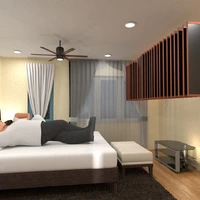
Your designs are beautiful. I have a couple questions if you don't mind. How did you create the vaulted or domed ceilings? Do I need to purchase an additional package for this?
Thank you,
Frustrated user.
2018-08-26 23:34:52

Micaela Maccaferri
Hallo Frusted User! :-)
At the time: ceiling vaulted is one kind of roof (you can find it in the construction list). For wood texture, you can download it from internet (for example Sketchup website).
However, the downloading option is paid on P5D.
About Wood beams, they made whit the cube and the texture is the same: from internet.
I hope I was clear, but if you need you can ask me
Have you a nice P5D!
2018-08-27 07:29:32
Micaela Maccaferri
But if you want you can copy my project, so is esiest to understand it
2018-08-27 07:31:23
aemarvel
Micaela,
Thank you so much, I was able to figure out how to apply a roof and disable the ceiling view, however, the issue I am encountering now is if I change the texture of that roof to wood, it shows as wood on the inside and outside. I'm not able to have the inside one texture and the outside another. Any ideas?
I may just copy your design to see what was selected. I am wondering if because I am in the States and you sit somewhere else, the versions functionality may be a bit different.
Again, thank you for your instruction!
Amy
2018-08-31 17:31:29
aemarvel
Oh, one last question, how did you get the wood beams to set at an angle along the end wall? I seem to only be able to have each end of the beam on a level angle. Not able to have one end of the beam higher than the other.
Thanks again,
Amy
2018-08-31 17:33:27
Micaela Maccaferri
Hi Amy! Ok: I think USA version is the same european version. If you click on the wall, outside your house, you can change ALL WALLS inside and outside, but if click on the wall inside, you can change one only wall (What wall do you want )
2018-09-01 10:45:00
Micaela Maccaferri
Cube again....you have to click on round arrow with shift: cube does not spin on the plan but in the space....:-)
2018-09-01 10:49:45
aemarvel
Hello Again Micaela, It's not a wall actually. I would like the inside texture of the roof (domed ceiling) different than the outside texture of the roof. Does that make sense?
2018-09-01 18:54:28
aemarvel
This worked beautifully!! Is there a legend or key listing functionality for keyboard and mouse? I hope you don't mind my, what seems now to be, silly questions. :)
Thanks a bunch
~Amy
2018-09-01 18:59:02
Micaela Maccaferri
Yes it does. But in the roof there's the trick ...
They are TWO roofs: one under and one over... :-)
2018-09-01 21:38:31
Micaela Maccaferri
Nothing question is stupid. Until four months ago there was a forum where you could ask questions or have solutions, but now they have taken it away but you can continue to ask me if you want ....
2018-09-01 21:44:48
aemarvel
GASP! Oh yes yes, so clever. Thanks so much. You're helping make my experience way better with this application. Much appreciated.
Take care and be well!
~Amy
2018-09-01 22:29:47
aemarvel
You're the sweetest, thank you Micaela.
2018-09-01 22:30:15

{comment}
{createdAt}