Produkter
Produkter
Produkter Programvara för husdesign Planner 5D pro AI Inredningsverktyg Mood Boards 360 Walkthrough AI Planritningsomvandlare Anlita en designer
Plattformar iOS Android Windows macOS VisionOS
Resurser
Resurser
Lära Onlineskola för inredningsdesign Inredningstävlingar
Utforska Galleri med 3D-renderingar Bästa Inredningsdesigners
För Företag
För Företag
Företagslösningar Lösningar för skolor Partnerprogram
Prissättning
Inredningstävlingar
Språk
Språk
English Português Español Français Italiano Polski Lietuviškai Deutsch 中国 Sverige Русский
Ladda ner Planner 5D-appen Börja använda appen för att förbättra din upplevelse och låsa upp alla mobila funktioner
English Português Español Français Italiano Polski Lietuviškai Deutsch 中国 Sverige Русский
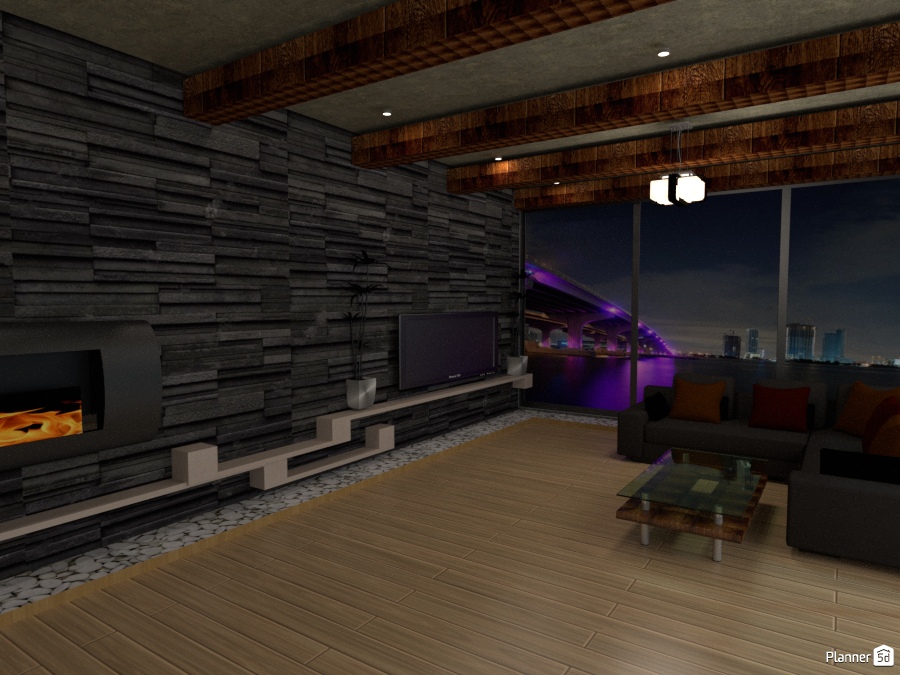
stone wall #1775920 by Jason
Apartment House Terrace Furniture Decor DIY Bathroom Bedroom Living Room Garage Kitchen Outdoor Kids Room Office Lighting Renovation Landscape Household Cafe Dining Room Architecture Storage Studio Entryway
2798

stone wall

By Jason 2017-06-01 00:35:54

Related Ideas

photos furniture ideas photos furniture ideas photos furniture ideas
Skapa min egen design
Add to favorites
+ 7

Designer’s notes

modern ideas

Comments (3)

Nicole K
Hi, I like your ideas. As I'm starting with 5D, could you please advice how you did the view behind the window??? I haven't found it (yet) in the offer... Would be fantastic, if you could :-) Thank you, Nicole
2017-06-04 20:39:25

Jason
Hello, what you do is click on "decor" option and find "paintings" click on it then find the square black and white painting with the bridge on it and move it to your project. Once you did that highlight the painting and click on the paintbrush then you'll see your options. click on the "camera" options and find a high resolution picture or background online or on your computer and apply it to the painting. Once you done that change the size of the painting to your preference then go to 2D mode and zoom in so you can see the layers of window frame on your project. The tricky part is you have to slide your new picture or painting in the middle of the window frame it should be the color blue. after that go to 3D mode and see if it worked or not and if it doesn't try again in 2D mode and that's it. The idea is your substituting the window with your picture. If your having trouble send me another comment and I'll get to it soon as possible.
2017-06-05 22:19:31
Jason
I think you can do this only on the web version of 5D planner.
2017-06-05 22:22:02

In favorites (11)

Micaela Maccaferri
Елена
Anonymous
MariaCris
Anonymous
Anonymous
Gemma
Элизабет Лионес
Clare Grant
Gisel Lujano
Ashley Kurtz
  • Om oss
  • Prissättning
  • Nyhetsrum
  • Kommittén för inredningsdesign
  • Juridisk information
  • Partnerprogram
  • Jobb
  • Hjälpcenter
  • 3D Garden Planner
  • Gym Floor Plan
  • Landscape Design Software
  • Home Design Software
  • Bathroom Planner
  • Room Planner
  • Kitchen Planner
  • Office Design
  • Floor Plan Software
  • Floor Plan Creator
  • Web
  • iOS
  • Android
  • macOS
  • Windows
  • Automatisk rumgenerator
  • AI-planigenkänning
  • AR-driven funktion för 3D-inredningsprojektering
  • Automatiserad möblering
  • Företagslösningar
  • Lösningar för skolor
  • Produktkonfigurator
  • Interior Design Blog
  • Skola för heminredning
  • Tävlingar i heminredning
  • Galleri med planritningar
  • Galleri med 3D-renderingar
Planner 5D ® © 2011—2025
Planner5D UAB, A. Goštauto St. 12A, Vilnius 01108, Lithuania
Follow:
Apps:
This site is protected by reCAPTCHA and the Google Privacy Policy and Terms of Service apply.

Alert
Enter your name please

Help Center

Avbryt
Vi kan bara erbjuda en gratis provperiod per person

Du har tidigare registrerat dig med dessa e-postadresser:

    Vi uppskattar ditt engagemang för vår produkt, så vi erbjuder dig 50% off ditt första år.